Web Cassette Studio
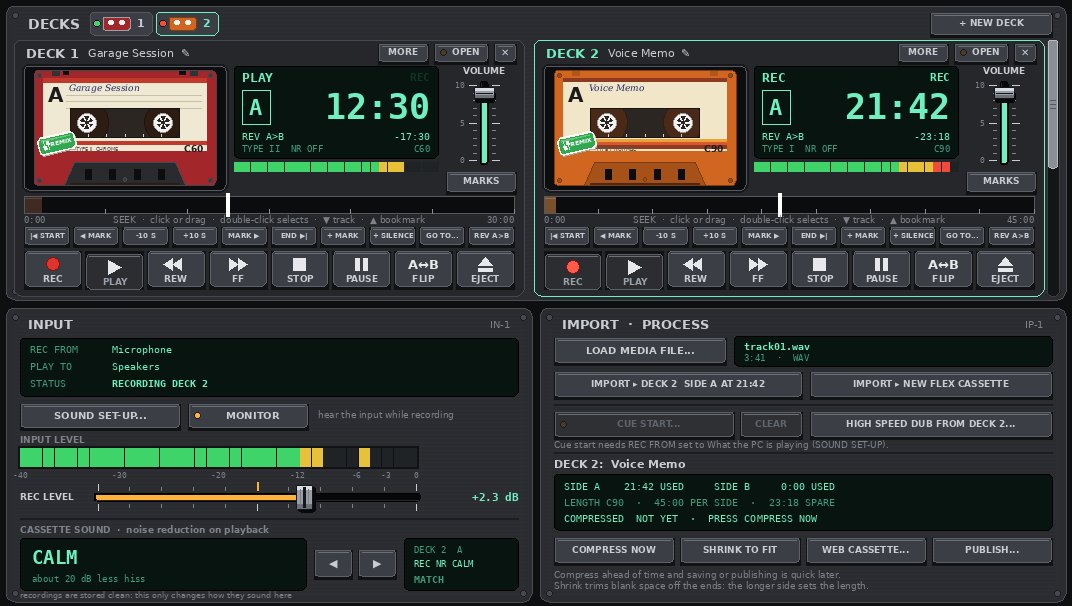
Remember making a mixtape? Choosing the songs, timing the gaps, writing the label by hand and handing it over to a friend. Web Cassette Studio brings all of that to the desktop. We record or import our sounds onto a cassette, give it a label and cover art, and send it out as a web cassette: a single file that plays in any browser, with nothing to install. A podcast, an album, a guided meditation, a voice letter or a birthday mix, all on a cassette that clicks, hisses and rewinds like the real thing.
Download it free
Web Cassette Studio, free version
DOWNLOAD FREE- A deck of its own. One deck that records, imports and plays.
- Record anything. A microphone, a line input, a USB interface, or whatever the computer is playing.
- Import in seconds. WAV, MP3, FLAC and OGG go onto a cassette far faster than real time, and the tracklist writes itself.
- Real cassette sound. C5 to C90 in Types I, II and III, each with its own character, plus six kinds of noise reduction. The recording underneath always stays clean.
- Edit like a studio. Drop bookmarks mid-take, then swap, move, cut and copy parts, add silence, and undo.
- Cover art in a click. J-cards with endless generated patterns or any picture, with fonts, a spine and the track list.
- Clickable tracks. Timed tracks let listeners jump straight to the song they want.
- Labels with personality. A title and a subtitle, shell colours, label styles and three kinds of handwriting.
- A shelf for the collection. Every cassette as a cover or a cassette, sorted and tagged.
- One button to share. A web cassette plays in any browser, five times smaller with compression, in the skin of the maker's choice.
- The maker's rules. Choose whether others may remix it, and attach a licence.
The full version
- As many decks as the desk will hold.
- Dub and mix. High speed dubbing from deck to deck, and CUE START to roll several decks the moment REC goes down.
- An effects rack. Reverb from a small room to a cathedral, echo, dusty record, old radio, worn cassette, chorus, warmth, lo-fi, fades and more, all previewed before they go on.
- Longer cassettes. C120, C240 and C480, plus FLEX cassettes that grow as the recording does, up to four hours a side, and SHRINK TO FIT makes any cassette as small as it can be.
- Typewriter and Block print lettering for the label.
- Type IV metal. The brightest, cleanest cassette of all.
- A cassette web site. A step-by-step set-up puts a player and a cassette library on any web server.
- Publish with a link. Share links show the cover and title in chat apps and on social media, and SYNC keeps every copy up to date.
- Ramapani skins for the player on that site.
- Full-size covers ready for shops and streaming services.
- The 70s Chrome look. Dress the whole studio in brushed aluminium and walnut, with piano-key controls, glowing blue displays and amber-lit needle meters.
Starting it for the first time
There is nothing to install. We unzip the download, put WebCassetteStudio.exe somewhere handy, and double-click it.
Ramapani is one person, and the Studio is not signed with a paid certificate, so Windows does not know its name yet. The first time it starts, Windows may show a blue box saying "Windows protected your PC".
- Click More info.
- Check that the app is WebCassetteStudio.exe.
- Click Run anyway. Windows remembers this for that copy.
Checking the download
To be sure your copy is exactly the one Ramapani built, compare its SHA-256 fingerprint with the
one here. In PowerShell: Get-FileHash .\WebCassetteStudio.exe
WebCassetteStudio.exe 7E0462E978EB964791D29A530420378AAD06931E20EBCD809EBB873CD1FD6CD4
WebCassetteStudio.zip 05A34E81ABC0C89F5B8E02A16499B0B50243A6FB1C40107B3BEE26FACAE680B7


 Join free, or unlock Inner-Light for enhanced tools, exclusive creations and very generous discounts


 Subscribe without emails | RSS Feed
